TuneLoft or TiviMate?

Two players, two ideas of television. The right pick mostly depends on your screens.

In short

Pick

TiviMate if…

  • Everything happens on one Android TV, with the remote.
  • Your provider uses a Stalker portal.
  • You want the most proven app of its kind: over 5 million installs on Google Play.

Pick

TuneLoft if…

  • You watch on several screens: TV, tablet, Meta Quest headset.
  • You never want to type a stream address with a remote again: the phone types and sends.
  • Your Plex, your NAS or your files belong next to live channels.
  • You want to record on the phone and watch on the screen you choose.

They are not mutually exclusive: both are players, and the same M3U playlists and Xtream logins work in either.

The gesture that changes everything

Sources are typed on your phone’s keyboard, not with the remote

Typing a stream address, a username and a password on a television keyboard, letter by letter with the arrows of a remote, is the worst moment of any setup — and it starts over on every device. TuneLoft Companion does it for you: you enter the source once on your phone, then send it to the screen. In a Meta Quest headset, where you type on a floating keyboard with a pointer, the difference is even starker.

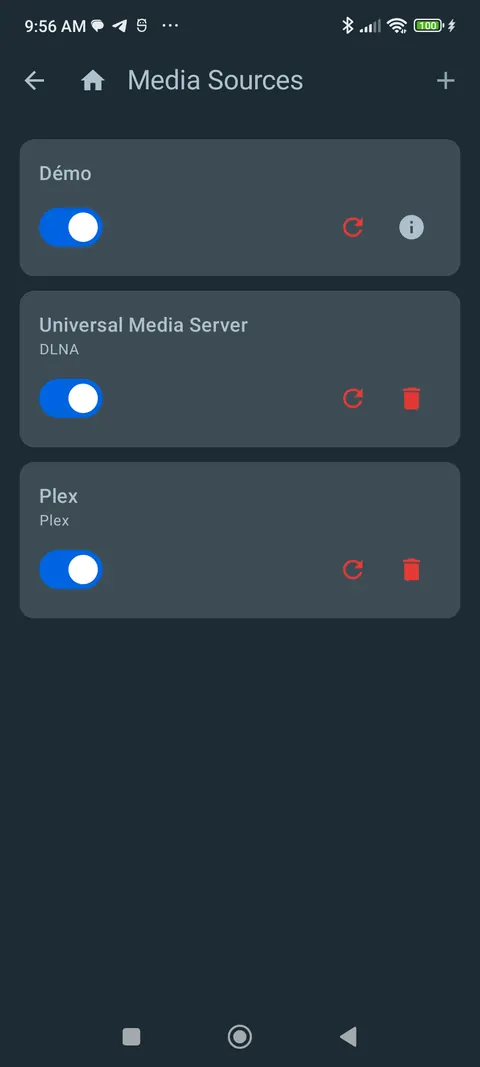
  • M3U, Xtream Codes, DLNA or Plex: the same form, on your phone’s keyboard.
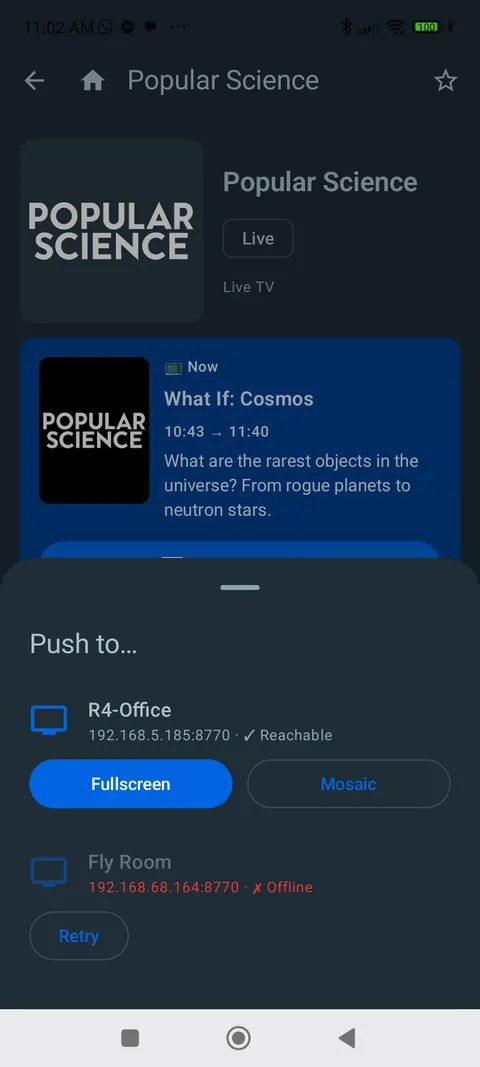
  • Send it to the device you choose — the living-room TV, the tablet, the headset.
  • Credentials travel over your own network, never through our servers.
  • Programmes travel too, not just sources: you find one on the phone, the screen plays it.
Media sources screen on the phone, listing the demo, a DLNA server and Plex.
Set the source up on the phone…
“Push to…” sheet listing a TV, with Fullscreen and Mosaic options.
…then send it to the screen.

Side by side

Screens

Android TV · Google TV

TuneLoft TuneLoft : Yes. Google Play
TiviMate TiviMate : Yes. Google Play, built for the remote

Fire TV

TuneLoft TuneLoft : Yes. Guided install from tuneloft.tv
TiviMate TiviMate : Not advertised. Not mentioned on the official listing

Android tablet

TuneLoft TuneLoft : Yes. The same app, by touch
TiviMate TiviMate : No. “Not optimized for touch devices” (listing)

Meta Quest

TuneLoft TuneLoft : Yes. Horizon Store, in mixed reality
TiviMate TiviMate : Not advertised. Not advertised

Sources

M3U playlists · Xtream Codes

TuneLoft TuneLoft : Yes. One active for free, unlimited with Plus
TiviMate TiviMate : Yes. Yes

Stalker portal

TuneLoft TuneLoft : No. No
TiviMate TiviMate : Yes. Yes

Plex

TuneLoft TuneLoft : Yes. Libraries and channels
TiviMate TiviMate : Not advertised. Not advertised

DLNA / UPnP (NAS, PC)

TuneLoft TuneLoft : Yes. Unlimited, even for free
TiviMate TiviMate : Not advertised. Not advertised

Guide and live

Programme guide

TuneLoft TuneLoft : Yes. Every source in the same grid
TiviMate TiviMate : Yes. Yes

Catch-up on past programmes

TuneLoft TuneLoft : Yes. From the provider’s archive Plus
TiviMate TiviMate : Yes. Yes

Several channels on screen

TuneLoft TuneLoft : Yes. Up to 4, mixed sources Plus
TiviMate TiviMate : Yes. Yes, maximum not stated on the listing

Recording

On the TV or tablet

TuneLoft TuneLoft : Yes. Record and schedule Plus
TiviMate TiviMate : Yes. Yes

From the phone

TuneLoft TuneLoft : Yes. Encrypted, then played on the Plus screen you choose Free
TiviMate TiviMate : Not advertised. Not advertised

On Meta Quest

TuneLoft TuneLoft : No. No, by design
TiviMate TiviMate : Not advertised. Not advertised

Phone

Entering a source (address, credentials)

TuneLoft TuneLoft : Yes. On the phone’s keyboard, then sent to the screen Free
TiviMate TiviMate : Not advertised. With the remote; no phone-side entry advertised

What the phone app does

TuneLoft TuneLoft : Yes. Guide, keyboard, remote, recorder Free
TiviMate TiviMate : No. Unlocks Premium and manages devices — not a player, says its listing

Send a programme to a screen

TuneLoft TuneLoft : Yes. To any paired device; without Plus, a screen only plays its own sources Free
TiviMate TiviMate : Not advertised. Not advertised

Pricing

Free version

TuneLoft TuneLoft : Yes. No account, with a demo playlist
TiviMate TiviMate : Yes. Yes, Premium features are paid

Paid plan

TuneLoft TuneLoft : Yes. $4.99/month or $39.99/year, 5 devices, 15-day trial with no card Plus
TiviMate TiviMate : Yes. Premium — prices not published on the listing Premium

Where you pay

TuneLoft TuneLoft : Yes. On tuneloft.tv: one subscription covers your 5 devices
TiviMate TiviMate : Yes. In the app, or through TiviMate Companion

What a table doesn’t show

Recording lives in your pocket

TuneLoft Companion records on the phone, for free and with no account. You then push the recording to the living-room TV, the tablet or the TV in another room: the screen plays it, with Plus. The recording stays encrypted inside the app — it follows you, it doesn’t become a file to share.

See the phone app →

At a friend’s place, without leaving your credentials

A stream address often carries your credentials in the clear. When TuneLoft sends a programme to a screen that doesn’t know the source, playback is ephemeral: no history, no resume, no favourite, and nothing is left behind — the receiving screen needs Plus. Nothing goes through our servers.

See the phone → screen journey →

One headset, several screens

On Meta Quest, TuneLoft places the screens in your room, in mixed reality: one programme large, others beside it. The same account covers the headset, the TV and the tablet.

See TuneLoft on Quest →

Common questions

Does TuneLoft replace TiviMate?

If everything happens on one Android TV with the remote, TiviMate remains an excellent choice, and it supports Stalker portals, which TuneLoft does not. TuneLoft aims elsewhere: several screens driven from the phone, Plex and your NAS next to live channels, and Meta Quest.

Can I keep my playlists?

Yes. Both apps are players: an M3U playlist or an Xtream login works in either, and nothing stops you from using both on the same TV.

Is recording free in TuneLoft?

On the phone, yes: TuneLoft Companion records with no account and no subscription. Playing that recording back, and recording directly on the TV or tablet, takes TuneLoft Plus (or the 15-day trial). Meta Quest does not record.

Do TuneLoft or TiviMate provide channels?

No, neither does. Both are players: they play the sources you point them at. TuneLoft does not provide, host, resell or recommend any content, and TiviMate’s listing says the same on its side.

How this comparison was made

Written on September 17, 2026. For TiviMate, based only on its official Google Play listings — the app (version 5.3.3, June 22, 2026) and TiviMate Companion. Anything those listings don’t advertise is marked “not advertised”, which doesn’t mean it’s missing. Spotted a mistake or an outdated line? Write to support@tuneloft.tv and we’ll fix it.

TiviMate is a trademark of its publisher. TuneLoft is not affiliated with or endorsed by TiviMate.